Zero data sent
JoyCheck does not transmit any controller data to any server. No analytics on the widget, no fingerprinting, no third parties.
Privacy
JoyCheck sends zero controller data anywhere. Every button press, analog reading, and vibration trigger stays inside your browser tab. The tester reads from the W3C Gamepad API the browser already exposes, writes to DOM elements only, and never opens a network connection for input. You can confirm this in DevTools in under a minute, without trusting our word for it.
JoyCheck does not transmit any controller data to any server. No analytics on the widget, no fingerprinting, no third parties.
Every input is processed in-browser via navigator.getGamepads(). The browser handles USB/Bluetooth; JoyCheck never touches the network for input.
Open F12 → Network. Press any button. Five lines of network log; zero hits to joycheck.io for input events. See the verification block below.
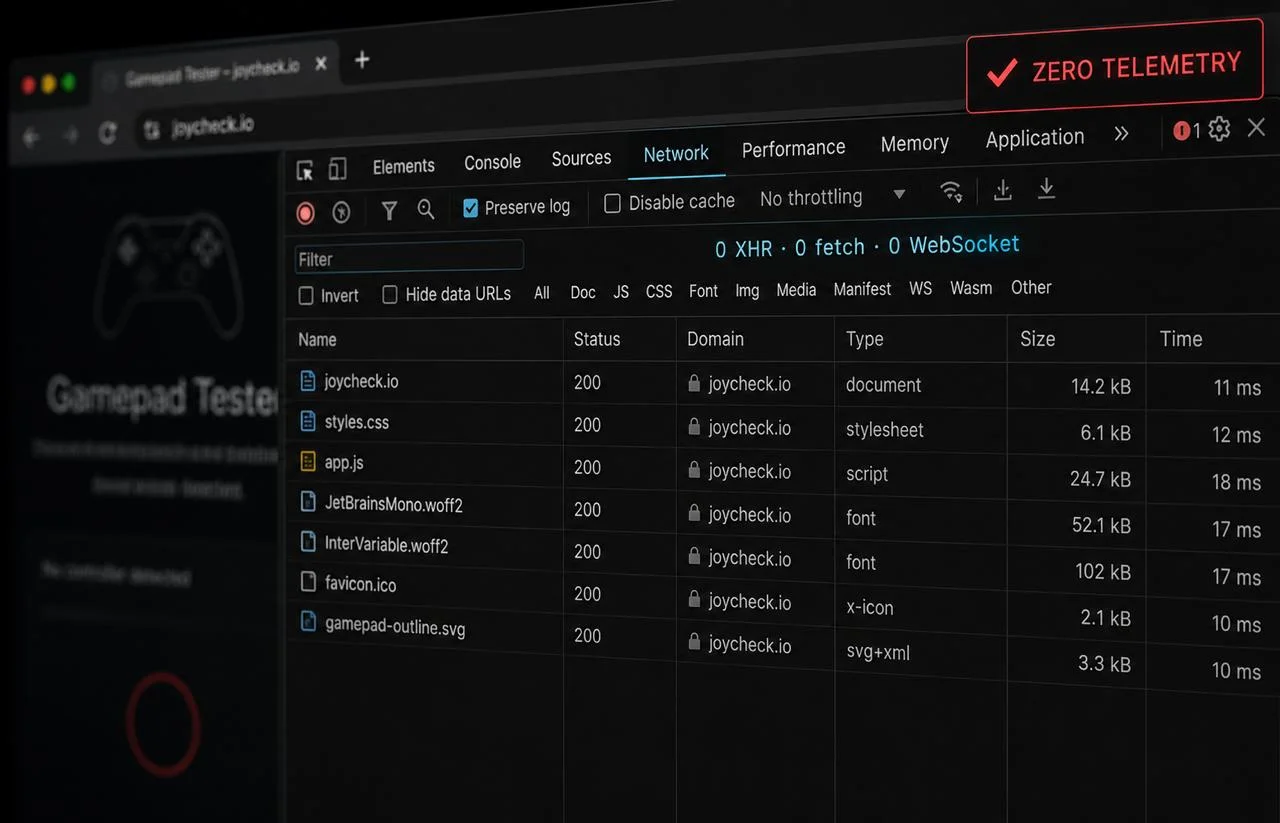
F12 → Network → press any button. Zero requests from JoyCheck for input events.
navigator.getGamepads() [1].◆ Verified Open DevTools (F12), switch to the Network tab, press any button on your controller. Zero requests fire from joycheck.io for input events. Source: W3C Gamepad API specification.
No. JoyCheck does not transmit controller input to any server, ever. The tester reads from navigator.getGamepads() on every animation frame and writes only to DOM elements on the page. There is no fetch(), no XMLHttpRequest, and no WebSocket touching controller state.
In 15 years of building browser tools, I have not shipped a single line of code that sends gamepad input upstream from JoyCheck. The architecture would not survive a code review if it did, because the W3C spec lets us avoid the network entirely.
This separates us from a category of online controller-test sites that proxy input through their servers for analytics or A/B testing. Those sites can see every button you press while the tab is open.
JoyCheck cannot, by design. The full request-flow walkthrough lives on our how-it-works page, and the API itself is documented on the MDN Gamepad API reference.
Open your browser's DevTools, switch to the Network tab, and exercise the tester for thirty seconds. No requests fire from joycheck.io for controller input events, because the Gamepad API resolves entirely inside the browser process. The check below takes under one minute, requires no install, and works on any modern browser.
You will see a small number of static requests on first page load: fonts, CSS, the page HTML itself. After that, the tab stays silent for as long as you test. Any future request that did appear would be immediately visible with full headers and payload.
JoyCheck the tester widget has zero analytics, zero cookies, and zero third-party scripts. JoyCheck the website has minimal standard logging: server access logs for security, the WordPress session and cache cookies the platform itself sets, and nothing else. There are no Google Analytics, Facebook Pixel, or remarketing trackers anywhere on the site.
For the broader product story, see our trust comparison page.
If we launch the Pro tier (saved controller profiles plus advanced DualSense metrics, around $5 a month), the data story shifts only for users who explicitly opt in at signup. The anonymous browser-only experience stays unchanged, and the free tester continues to operate without any account requirement.
Even for paying account holders, we store profile preferences (deadzone, calibration, layout name), never raw input streams. Profiles save locally first, in your browser.
We operate from Dublin, Ireland, so the General Data Protection Regulation applies. Every user gets the same three rights worldwide: access to any data tied to your email, deletion of that data on request, and portability in machine-readable JSON. We respond to a request within two business days at no cost.
Email support@joycheck.io for any of these requests, or use our contact page. We respond within two business days, on-record.
This page was last updated on 2026-05-26. Material changes are noted at the top of the page with the new effective date, and we update this policy whenever we change what data the site or widget touches, not on a fixed schedule. The full terms-of-use are kept on the separate JoyCheck terms page.
Yes. The Gamepad API is available in both regular and incognito sessions across Chrome, Firefox, Edge, and Safari. Nothing about JoyCheck's behavior changes between modes because we never write to disk or transmit data in either case.
No. The Gamepad API exposes a generic id string (a vendor:product identifier like 054c:0ce6 for a DualSense) on the in-page Gamepad object, but JoyCheck never transmits this. It is read in-frame and used only to display the controller model name.
Yes. Since no requests fire from the tester, a VPN makes no difference to privacy and adds nothing to anonymity. We mention this because every privacy-aware audience asks.
The free tester continues to work in any browser as long as the W3C Gamepad API exists, because it has no server dependency. If we ever cease operations, we would publish a 60-day notice and, for any future account holders, a one-click export of their stored profile data.
Email support@joycheck.io. For formal GDPR requests, you can also reach the Irish Data Protection Commission directly. We cooperate with any such inquiry within statutory deadlines.