PRIVACY
Privacy at JoyCheck
The JoyCheck tester sends zero controller data anywhere. No cookies, no analytics, and no fingerprints inside the tester, because every check runs in your own browser. Verify it in the DevTools Network tab. Site analytics load only with your consent.
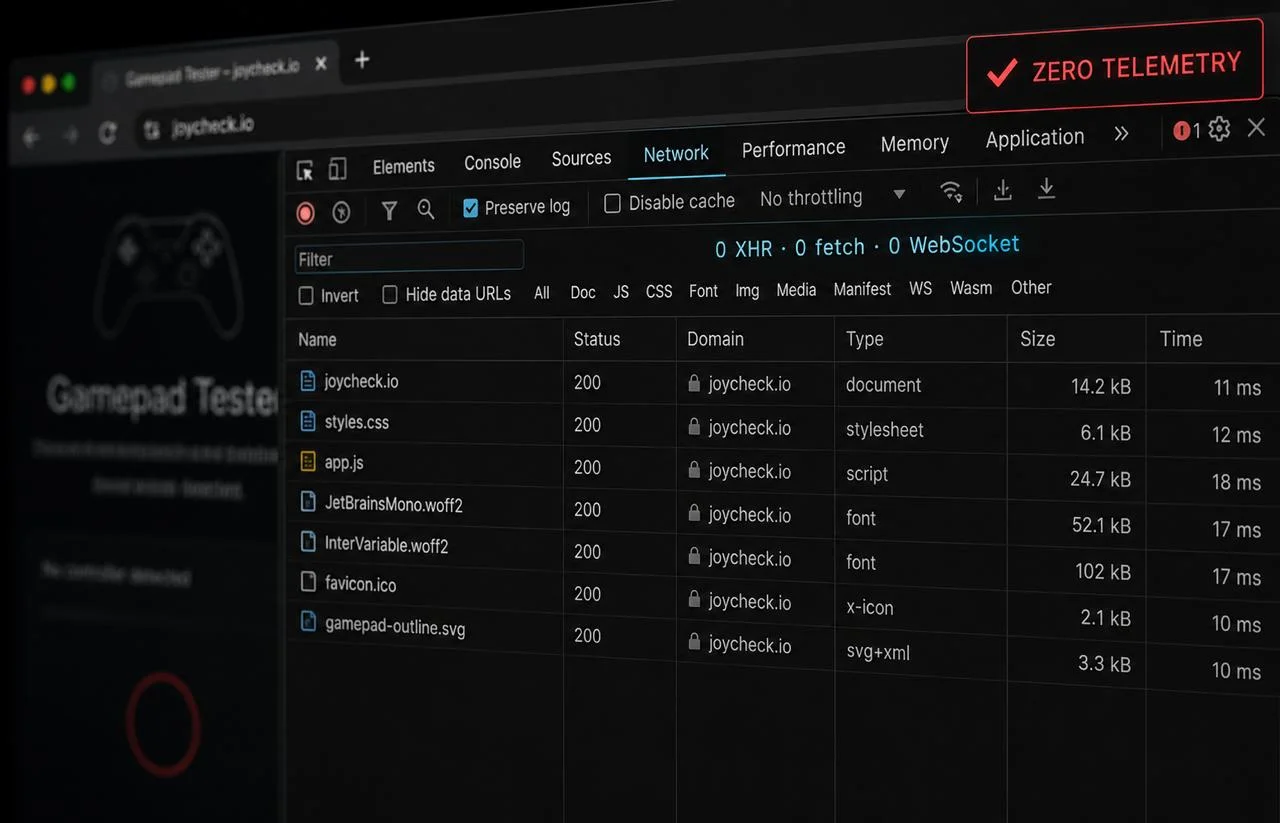
JoyCheck is built to send zero controller data anywhere: every check runs in your own browser, which you can confirm in DevTools.
Updated on 2026-09-14 by Taimoor Bamazai, founder of Elites Algorithm Limited (a registered tech company in Dublin, Ireland).
JoyCheck sends zero controller data anywhere. Every button press, analog reading, and vibration trigger stays inside your browser tab. The tester reads from the W3C Gamepad API the browser already exposes, writes to DOM elements only, and never opens a network connection for input. You can confirm this in DevTools in under a minute, without trusting our word for it.
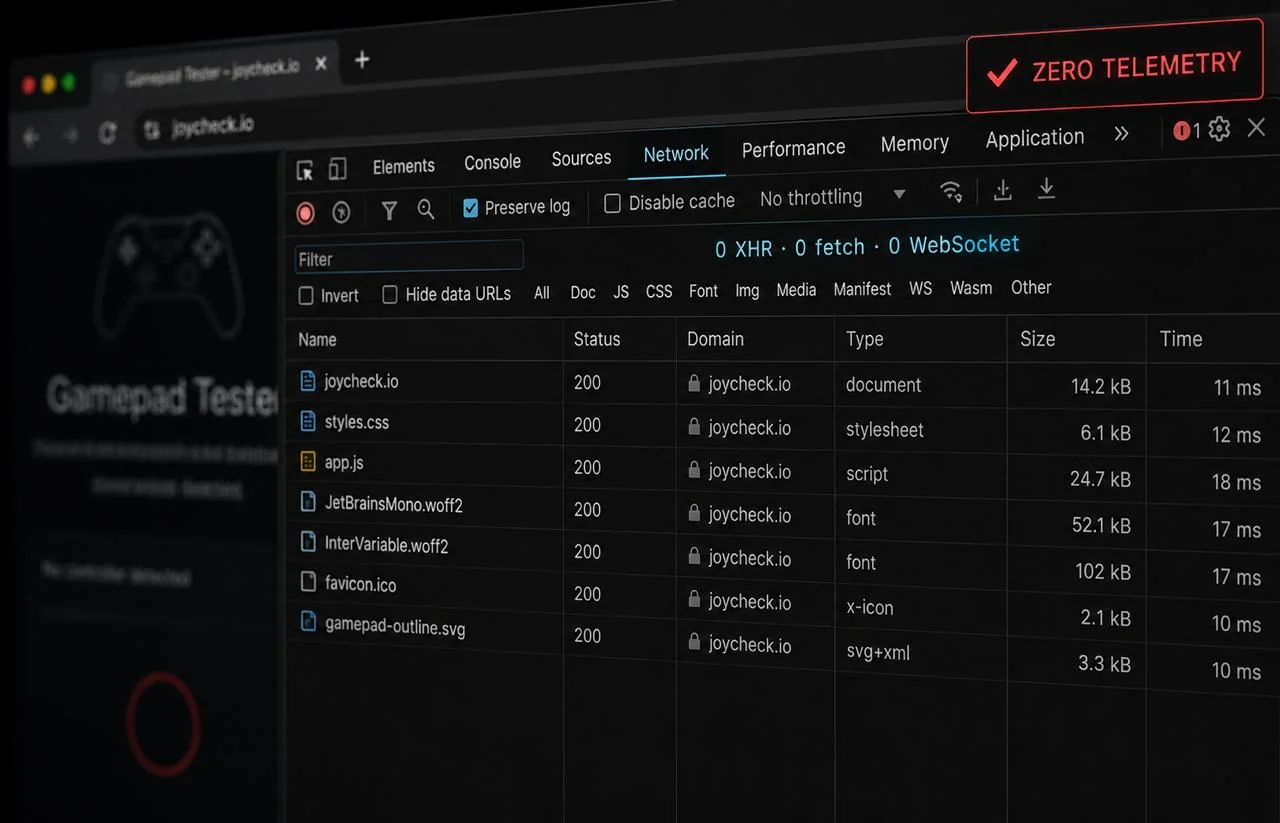
How your data is handled, in short
- Zero controller data is transmitted to any server, ever.
- All input handling runs in-browser through navigator.getGamepads() [1].
- You can verify this yourself in DevTools, Network tab, in under one minute.
- We operate from Dublin under GDPR. Access, deletion, and portability rights apply to any data tied to an account.
Open DevTools (F12), switch to the Network tab, press any button on your controller. Zero requests fire from joycheck.io for input events.
Source: W3C Gamepad API specification
Does JoyCheck collect any controller data?
No. JoyCheck does not transmit controller input to any server, ever. The tester reads from navigator.getGamepads() on every animation frame and writes only to DOM elements on the page. There is no fetch(), no XMLHttpRequest, and no WebSocket touching controller state.
JoyCheck has no code that sends gamepad input to a server. The architecture would not survive a code review if it did, because the W3C spec lets us avoid the network entirely.
This separates us from a category of online controller-test sites that proxy input through their servers for analytics or A/B testing. Those sites can see every button you press while the tab is open.
JoyCheck cannot, by design. The full request-flow walkthrough lives on our how-it-works page, and the API itself is documented on the MDN Gamepad API reference.
How can I verify JoyCheck sends nothing?
Open your browser’s DevTools, switch to the Network tab, and exercise the tester for thirty seconds. No requests fire from joycheck.io for controller input events, because the Gamepad API resolves entirely inside the browser process. The check below takes under one minute, requires no install, and works on any modern browser.
- Open the controller tester in Chrome or Firefox.
- Press F12 or right-click and choose Inspect.
- Click the Network tab and clear the log.
- Press any button on your controller and exercise the sticks for 30 seconds.
- Watch the Network panel; no requests fire from JoyCheck for controller events.
You will see a small number of static requests on first page load: fonts, CSS, the page HTML itself. After that, the tab stays silent for as long as you test. Any future request that did appear would be immediately visible with full headers and payload.
What about website analytics and cookies?
The controller tester still sends zero data. No analytics, no cookies, and no third-party scripts run inside the tester itself, and you can confirm that in DevTools exactly as described above. That does not change.
The website around it (the pages, guides, and menus) uses Google Analytics 4, loaded through Google Tag Manager, so we can see which guides are useful and how the site performs. This runs only if you accept in the cookie banner. If you decline, or simply ignore it, no analytics or advertising cookies are set and no analytics data is sent to Google: the measurement tags run in a denied state (Google Consent Mode v2) until you opt in. In DevTools you will still see the Tag Manager and AdSense script files themselves load; those are static downloads, and the Google tags set no analytics or advertising cookies while the denied state holds.
- Consent first. The Google tags load in a denied state through Consent Mode v2, so no analytics or advertising cookies are set and no personalised measurement runs until you press Accept. You can change or withdraw your choice at any time from the Cookie settings link in the footer.
- What we measure, only after consent. Page views, scroll depth, outbound and download clicks, and anonymous performance (Core Web Vitals). We never collect names, emails, or controller input.
- Advertising. JoyCheck shows ads through Google AdSense. Google and its ad partners use cookies and device identifiers to serve those ads, to cap how often you see them, to measure them, and to decide whether they are personalised. Ad cookies are set only if you accept in the cookie banner. If you decline, the AdSense script file still loads, because Google needs it present to verify the site, but it runs in the denied state: no advertising cookies are stored and no ad personalisation happens. You can change your choice at any time from the Cookie settings link in the footer, read how Google uses information from sites that use its services, and control personalisation at Google Ad Settings. The embeddable tester at
/embed/carries no ads and no ad scripts at all — that layout is locked toconnect-src 'none'. On the rest of the site, including the tester pages, the AdSense tag is present, but it never receives your controller input: the zero-data guarantee on your controller data is unchanged. No Meta Pixel and no TikTok Pixel run anywhere on this site. - Audience measurement (Grow by Mediavine). We are evaluating Mediavine as a future advertising partner, and during that evaluation their Grow script runs across the site, including the tester pages, so Mediavine can measure how much traffic JoyCheck receives. It shows no ads and displays nothing on the page: every optional Grow feature (email capture, sharing buttons, content recommendations) is switched off. Like the analytics and advertising tags above, this script loads only after you accept in the cookie banner. If you decline, it does not load, and anything it stored on an earlier visit is removed. When it runs, it stores a cookie named
growme_version, which holds a build number only, and a browser entry namedgrowMeSnowplowUserInfoholding a randomly generated visitor ID, a session ID, and a visit count, so that the same person is not counted twice. It never receives your controller input, your name, or your email. You can read Mediavine’s legal and privacy center, or block the script with any content blocker. The embeddable tester at/embed/carries no Grow script and no analytics at all — that layout is locked toconnect-src 'none', so it cannot contact any third party. On the rest of the site Grow loads only with your consent, and it never receives your controller input: the zero-data guarantee on your controller data is unchanged. - Server access logs. IP address, user-agent, page requested, response code. Retained 30 days for security and abuse prevention. Never tied to tester activity.
What changes if I sign up for the planned Pro account?
If we launch the Pro tier (saved controller profiles plus advanced DualSense metrics, around $5 a month), the data story shifts only for users who explicitly opt in at signup. The anonymous browser-only experience stays unchanged, and the free tester continues to operate without any account requirement.
Even for paying account holders, we store profile preferences (deadzone, calibration, layout name), never raw input streams. Profiles save locally first, in your browser.
- Profiles save locally first in your browser (IndexedDB and LocalStorage).
- Sync to an account server is opt-in only at signup.
- Synced data is limited to deadzone settings, custom calibration values, and saved layout names. Input streams stay in-browser as today.
- Account-level data is covered by the GDPR rights below.
What GDPR rights do I have?
We operate from Dublin, Ireland, so the General Data Protection Regulation applies. Every user gets the same three rights worldwide: access to any data tied to your email, deletion of that data on request, and portability in machine-readable JSON. We respond to a request within two business days at no cost.
- Right of access (GDPR Article 15). Receive a copy of any data tied to your email within 30 days.
- Right to erasure (GDPR Article 17). Delete any data tied to your email within 30 days.
- Right to data portability. Receive your stored profiles in a machine-readable format (JSON).
Email support@joycheck.io for any of these requests, or use our contact page. We respond within two business days, on-record.
When did this policy last change?
This page was last updated on 2026-09-14. Material changes are noted at the top of the page with the new effective date, and we update this policy whenever we change what data the site or widget touches, not on a fixed schedule. The full terms-of-use are kept on the separate JoyCheck terms page.
Privacy sources and regulations
- W3C Gamepad API specification, w3c.github.io/gamepad
- MDN Web Docs, “Gamepad API”, developer.mozilla.org/Gamepad_API
- MDN Web Docs, “IndexedDB API”, developer.mozilla.org/IndexedDB_API
- GDPR Article 15, Right of access by the data subject, gdpr-info.eu/art-15-gdpr
- GDPR Article 17, Right to erasure, gdpr-info.eu/art-17-gdpr
Frequently asked questions
Does JoyCheck work in incognito or private browsing mode?
Yes. The Gamepad API is available in both regular and incognito sessions across Chrome, Firefox, Edge, and Safari. Nothing about JoyCheck's behavior changes between modes because we never write to disk or transmit data in either case.
Does JoyCheck see my controller's serial number?
No. The Gamepad API exposes a generic id string (a vendor:product identifier like 054c:0ce6 for a DualSense) on the in-page Gamepad object, but JoyCheck never transmits this. It is read in-frame and used only to display the controller model name.
Can I use JoyCheck behind a VPN?
Yes. Since no requests fire from the tester, a VPN makes no difference to privacy and adds nothing to anonymity. We mention this because every privacy-aware audience asks.
What happens to my data if Elites Algorithm shuts down?
The free tester continues to work in any browser as long as the W3C Gamepad API exists, because it has no server dependency. If we ever cease operations, we would publish a 60-day notice and, for any future account holders, a one-click export of their stored profile data.
Who do I contact about privacy concerns?
Email support@joycheck.io. For formal GDPR requests, you can also reach the Irish Data Protection Commission directly. We cooperate with any such inquiry within statutory deadlines.